
|
|
|
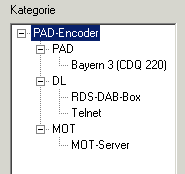
PAD-Encoder ConfigurationTree Item of Type PAD
Tree Item of Type RDS
Tree Item of Type DL
Tree Item of Type MOT
Statistics Page
General Informationen
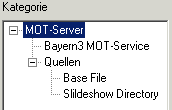
MOT-Server ConfigurationTroubleshootingTree Item of Type Global Settings
Tree Item of Type Slot
Statistics Page
General Informationen
The software package consists of two modules:
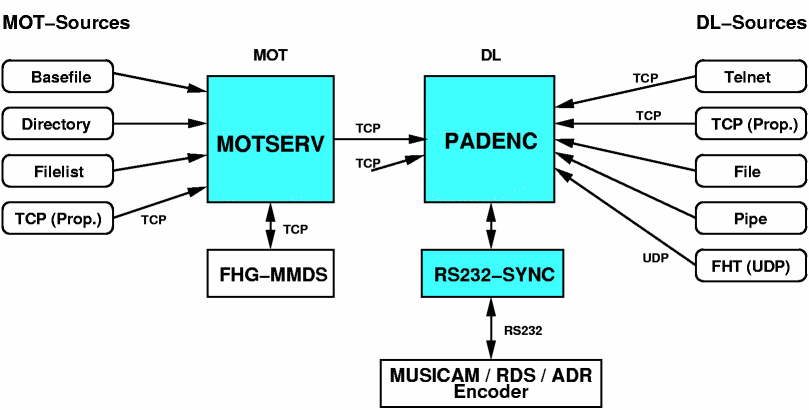
1. The
PAD-Encoder
is responsible for multiplexing different data sources (dynamic labels
and MOT services) and packing them into smaller packets. Those Pakets
are sent to a Musicam, RDS- or ADR encoder.
The
PAD encoder supports the standard format for ancillary data of
Musicam-Encoders in DAB-Mode and the UEC protocol of RDS/ADR encoders.
The software was tested successfully with those encoders:
2. The
MOT-Server
codes single files, whole directories or arbitrary data streams
accortding to the MOT specification. The server creates so
called MOT segments which are sent over a network connection to
the PAD encoder. The MOT server itself is capable of managing
multiple data sources and sending them simultanously.
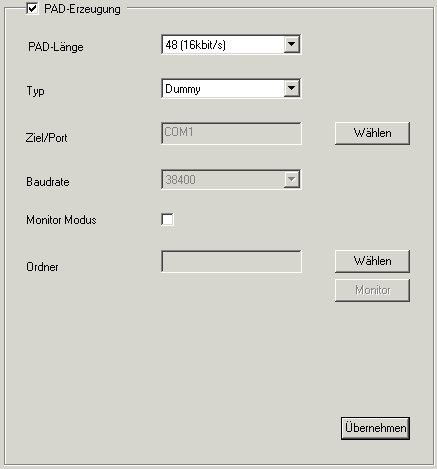
PAD-Size
: This value selects the size of the PAD data packets sent to the
Musicam encoder for a single MPEG1 Layer 2 frame. Normally the maximum
value of 48 should be selected to get the best data rate for the
program associated data.
However older encoders like the R&S Music or the AVT Magic do only
transmit realiable 16-24 bytes per frame otherwise the bit error rate
increases significantly.
Typ: Selects the type of connection to the Musicam encoder. The default is Dummy which does not transmit any data and is just for testing purposes or usage without any PAD encoders. Normally RS232 should be selected. A software Musicam encoder is connected via TCP/IP . This option is currently not available under windows.
Dest/Port: Is used to select the symbolic name of a serial port (COM1, COM2, etc.) or an IP address.
Baudrate: When connecting a Musicam encoders via RS232 a baudrate must be selected. The default value is 38400 Bit/s which is in most cases correct.
Monitor Mode: The PAD encoder has got a built in PAD decoder which allows to monitor the transmit data in the same manner as a DAB radio would do it . Therefor a Folder has to be selected.
Apply: Press apply to save and change the configuration of the PAD encoder. The checkbox in the upper left corner of the dialog activated or deactivates a complete configuration.
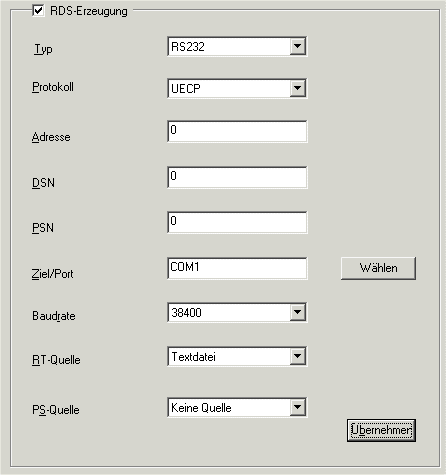
Typ: Selects the type of connection to the Musicam encoder. The default is Dummy which does not transmit any data and is just for testing purposes or usage without any RDS/ADR encoder encoders. Normally RS232 should be selected.
Protocol: Selects the communication protocol being used. Currently only UECP is supported.
Adresse/DSN/PSN: Normally 0. You can find detailed information at the RDS Universal Encoder Communication Protocol UECP Version 5.1 specification
Dest/Port: Is used to select the symbolic name of a serial port (COM1, COM2, etc.) or an IP address.
Baudrate: When connecting a RDS/ADR encoders via RS232 a baudrate must be selected. The default value is 38400 Bit/s which is in most cases correct.
RT-Source/PS-Source:
Selects the DL-Source which is sent via RDS/ADR. The labels of the
combo box correspond to the names of DL-Sources. RT means Radiotext
(64 characters maximum, every 5 seconds), PS means Programm
Station, i.e. the name of the station (8 characters maximum, every 2
seconds).
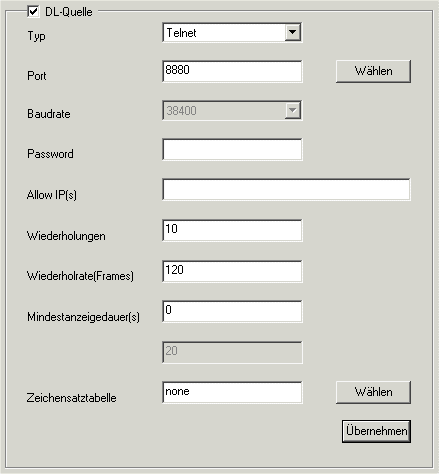
Type:
Repeat Count: The number of transmission repetitions for dynamic labels.
Repeat Rate: Specifies the numbe of MPEG frames after a dynamic label will repeated.
Display Time: This parameter specifies the time in seconds until the next dynamic label may be sent. All dynamic labels received in the meantime are buffered.
Period: When using file or pipe sources this field specifies a time in seconds after which a source is read again.
Charactertable:
For every DL source a character translation table can be specified.
This might become important if umlauts should be transmitted. DAB
define a character table according to an extended ISO-646 standard. A
table which converts the normal PC-OEM umlauts can be found in your
installation directory named ISO646.TXT. If the field is empty or
contains 'none' no conversion is done.
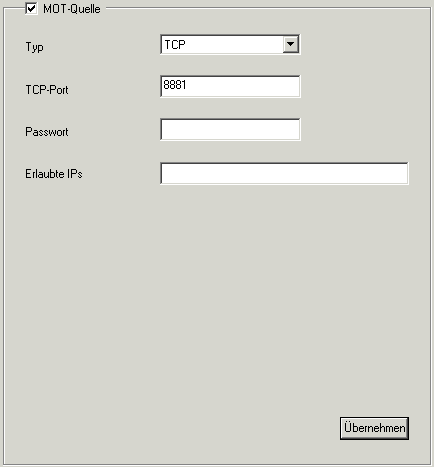
Type: The setting TCP describes how the MOT server is connected to the PAD encoder.
TCP-Port : The TCP/IP port can be selected here.
Password/Allowed IPs: These forms allow to set passwords and lists of IP addresses (seperated by semicolons) to prevent the PAD encoder from unauthorized access.
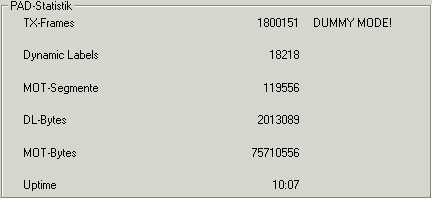
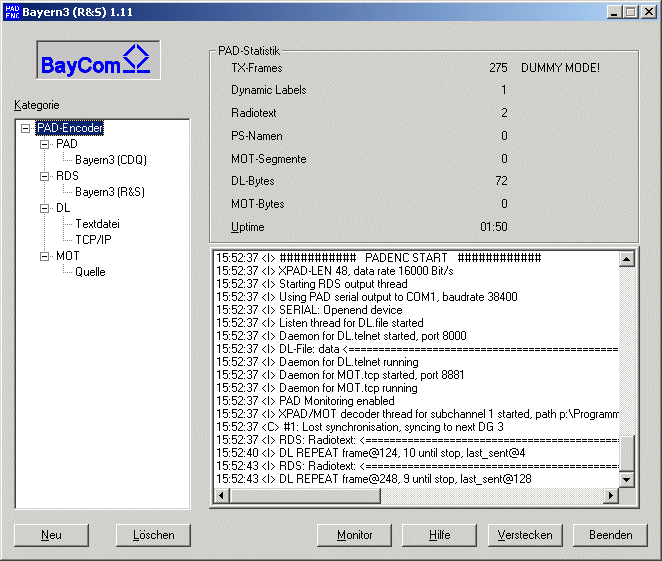
TX-Frames: Shows the number of transmitted audio frames. If the communication with the Musicam encoder broke down or is disturbed this value does not increment constantly.
Dynamic Labels/DL-Bytes: Shows the number of dynamic labels and bytes transmitted of all sources.
MOT-Segments/MOT-Bytes: Shows the number of MOT segments and bytes of all sources.
Uptime: Number of days, hours and minutes since the software was started.
The lower part of the statistics page shows textual output of the current internal state.
|
|
Therefore just clock with the left mouse button on the tree item, then click right to get the context menu and select rename. |
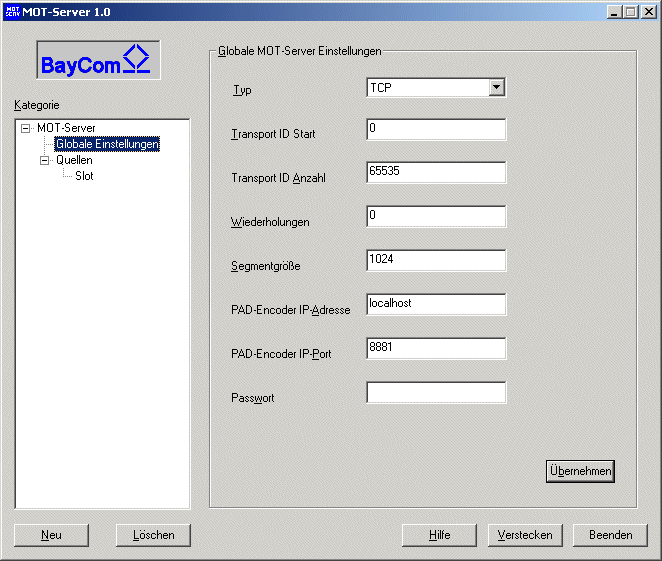
Type: The value Dummy allows to test a configuration without connection to a PAD encoder. The value TCP binds a MOT server to a PAD encoder or a FHG-MMDS on a specified IP address and a port.
Transport ID Start: If more MOT servers are bound to a PAD encoder, the used transport IDs used by the different MOT servers must not interfere. This value sets the smallest Transport ID to be used.
Transport ID Number: This value selects the number of Transport IDs for a particular MOT server.
Repetitions: If MOT segments should be repeated then this value selects the number of repetitions.
Segment size: The size of bytes for the MOT segments can be selected here.
PAD-Encoder IP address: Here you have to set the TCP/IP destination address of the PAD encoder. If MOT server and PAD encdoder is running on the same computer localhost or 127.0.0.1 has to be set.
PAD-Encoder IP-Port: Here the TCP/IP Port of the PAD encoders is set. By default port 8881 is used.
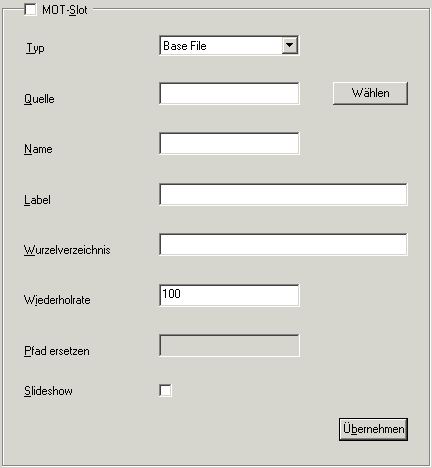
Type: Here different data and file types of the sources can be selected:
Base File is a single file, which is used to transmit the start page of interactive data services. As Source a file has to be selected. The Name is equivalent to the transmitted filename for that file. This allows for instance to transmit a file index.html as base.htm. As Label normally something like 'Index' is supplied.Source: A source can be a file, a filelist or a directory. For type URL an address beginning with http:// has to be used.
A Rootdirectory can be chosen to complete the path of the transmitted file.Directory takes a directory from the local filesystem from where all contained files are transmitted cyclically. Source has to be the full path to a directory. The Rootdirectory selects the path for the files from the directory. If the files of a directory should be transmitted as a slideshow just check the box Slideshow .
File List points to a list of files which are transmitted periodically. This list containes on each line a full path to a file. As a common path the input from the Replace path field is taken. Optionally seperated by a pipe symbol (|) followed by a number selects the seconds until the next file is transmitted. A further pipe symbol followed by 5 numbers selects the time of transmission in crontab style. The format looks like that:
Filename       Displaytime  Minutes Hour   Day Mon Weekday
---------------------------------------------------------
noon.jpg        | 12       | *      12     *   *   *
studiocam.jpg   | 10       | 6-59   *      *   *   *
traffic.jpg     | 20       | 5,30   6-21   *   *   *
news.jpg        | 15       | 0-4    6-21   *   *   *
stationlogo.jpg | 10       | */5    *      *   *   *
weekend.jpg     | 5        | *      *      *   *   6-7
The example above desmonstrated different facilities of the crontab format. The first column denotes the minutes followed by hours, day of the month and finally the weekday. It is possible to specifiy single or multiple points in time separated by comma or a period can be specified by using a dash (see line 1-4).
If a file should be transmitted every point in time a star has to be set in the corresponding column. If every column contains a star the file will be transmitted every minute. Intervals can be specified by */ followed by a number. Line 5 of the example above will transmit the stationlogo.jpg picture every 5 minutes.
The last line will only be active on days 6 and 7 i.e. saturday and sunday.URL allow to specify a HTTP:// a ddress, to fetch data directly from the internet and transmit them immediately.
URL-List specifies a file containing HTTP:// a ddresses, to fetch data directly from the internet and transmit them immediately.
Pipe calls an external programm and transmit its standard output.
Name: Specifies the name of the file to be used as Base File .
Label: allows to associate a file with a symbolic name for the Base File .
Rootdirectory: Specifies a virtual path of the file on the receiving host (DAB receiver).
Repetition Rate: Priority of this slot. The smaller tha value is the less frequent segments from this slot are transmitted.
Replace Path: When using filelists the leading path can be replaced by an arbitrary one.
Slideshow: Sets the trigger time to now for all files being transmitted. This makes a receiver display a slideshow.
Example for Rootdirectory/Replace path:
The filelist contains only files with (absolute) path names, which all start with "/radio1/mot/html/". To let the receiver put these files into "/service1/html/", a rootdirectory "/service1/" and a replace path "/radio1/mot/" have to be selected.
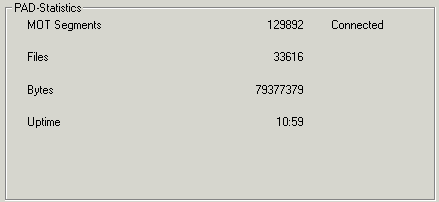
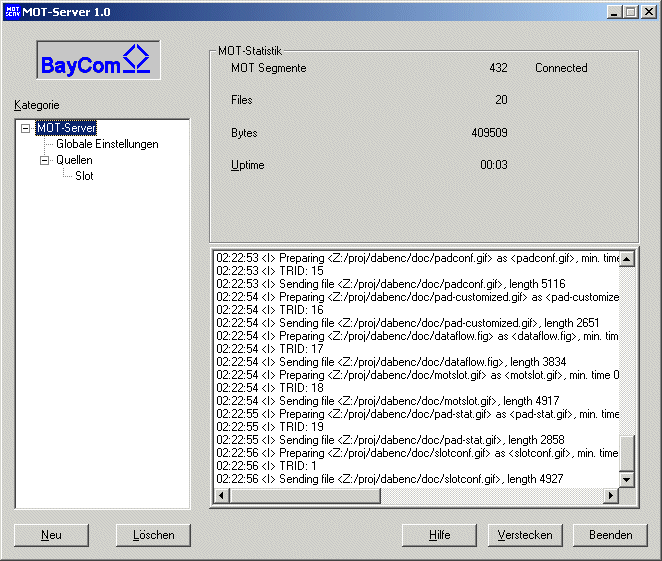
Files: Number of transmitted files.
Bytes: Number of transmitted bytes.
Uptime: Number of days, hours and minutes since the software was started.
The lower part of the statistics page shows textual output of the
current internal state.
|
|
Therefore just clock with the left mouse button on the tree item, then click right to get the context menu and select rename. |
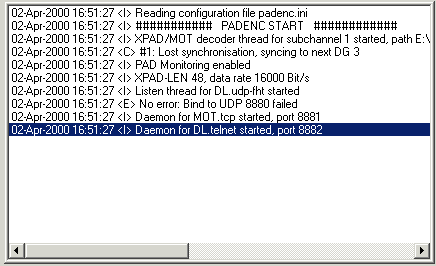
| Letter | Meaning |
| <I> | Information, used to describe simple I/O operations. |
| <W> | Warning, used to point out irregularities. |
| <C> | Critical condition, used to tell about correctable problems. |
| <E> | Error, designates a problem which cannot be solved without user intervention. |
| <D> | Debugging, used by software developers for internal information. |
The example above shows a critical condition, because the newly restarted software caused a drop out in the PAD data stream. This problem could be fixed by the software. A non correctable error is the message 'Bind to UDP 8880 failed'. This error says that the port 8880 is already in use by another application. To fix the problem the user has to change the port configuration.
Software updates can be found at
http://www.baycom.de
Back to Index
Appendix A: Keywords of the file padenc.ini
Section [PAD] : PAD-general settings
| Command | Parameter-Type | Allowed values | Description |
| type | String | dummy, rs232 | Output of the PAD stream |
| port | String | COM1 etc., /dev/ttyS0 etc. | Port for PAD output |
| baudrate | String | 9600, 19200, 38400, 57600 etc... | RS232-Baudrate |
| active | Integer | 0,1 | Activation of the PAD encoder |
| description | String | ... | textual description |
| monitor_enable | Integer | 0,1 | activation of the monitor mode |
| monitor_path | String | ... | Index of the HTML-Monitor file |
Section [DLx] : Settings Dynamic Label Source x
| Command | Parameter-Type | Allowed values | Description |
| type | String | telnet, tcp, udp-fht, udp-rs232, file, pipe | DL Source |
| port | String | COM1 etc., /dev/ttyS0 etc, TCP-Port (1024-65535) | Port for DL-Source (rs232/udp/telnet/tcp) |
| baudrate | String | 9600, 19200, 38400, 57600 etc... | RS232-Baudrate |
| active | Integer | 0,1 | activation of PAD encoder |
| description | String | ... | Textual decription |
| password | String | ... | Password DL-Source |
| accept_ip | String | ... | Allowed IP addresses (udp/telnet/tcp) |
| repeat_count | Integer | 0-99999 | DL repetitions |
| repeat_time | Integer | 0-99999 | time between repetitions (MP2-Frames) |
| priority | Integer | 0-99999 | minimum display time (s) |
| period | Integer | 0-99999 | Update time (s) |
Section [MOTx] : Settings MOT Source x
| Command | Parameter-Type | Allowed values | Description |
| type | String | tcp | MOT Source |
| port | String | TCP-Port (1024-65535) | Port for MOT source |
| active | Integer | 0,1 | activation of the PAD encoders |
| description | String | ... | Textueal description |
| password | String | ... | Password DL source |
| accept_ip | String | ... | Allowed IP addresses (udp/telnet/tcp) |
Appendix B: Keywords of the file motserv.ini
Section [MOT] : MOT-general settings
| Command | Parameter-Type | Allowed values | Description |
| type | String | tcp | MOT target |
| pad_host | String | TCP-Port (1024-65535) | Host for MOT-target |
| pad_port | String | TCP-Port (1024-65535) | Port for MOT-target |
| transaction_id_start | Integer | 0-64000 | Start Transport-IDs |
| transaction_id_size | Integer | 0-64000 | Number of Transport-IDs |
| segment_length | Integer | 0-64000 | MOT-Segmentsize |
| description | String | ... | Textual description |
Section [SLOTx] : Settings MOT Source x
| Command | Parameter-Type | Allowed values | Description |
| type | String | basefile, directory, filelist, url, urllist | Sourcetype |
| active | Integer | 0,1 | activation of the MOT-Slot |
| source | String | ... | Filepath/Directory/Fileliste |
| label | String | ... | Label for base file |
| rate | Integer | 1-10000 | Priority |
| slideshow | Integer | 0,1 | Slideshow (Triggertime=now) |
| description | String | ... | Textual description |
| name | String | ... | File name of the Startfile |
| root | String | ... | Receiver root directory |
| replace | String | ... | base directory of the filelist |